
Interactive PTY Terminal with GPU Acceleration
Full /dev/pts pseudo-terminal emulation passing all requiretty checks. True 24-bit TrueColor, split panes, Nerd Fonts, Catppuccin color themes, and infinite scrollback — blazing fast at 120 FPS.
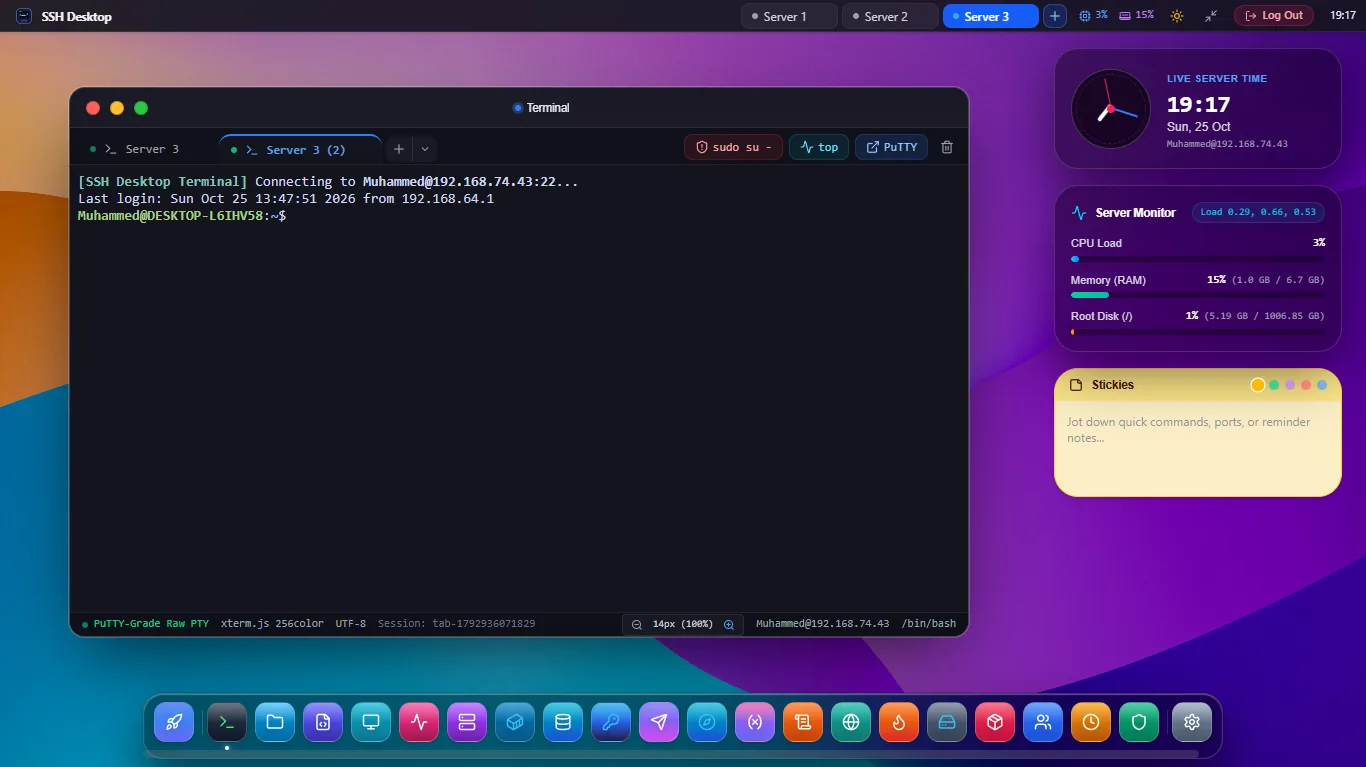
Built for High-Throughput Linux Engineering
Traditional web terminals lag, drop escape sequences, and freeze on large log dumps. SSH Desktop handles millions of lines with zero frame drops.
Real Pseudo-Terminal (PTY)
Allocates true /dev/pts device files on Linux. Passes strict requiretty security checks for sudo commands, and handles dynamic SIGWINCH window resize signals cleanly.
GPU WebGL Rendering Engine
Leverages the Xterm.js WebGL addon to offload text rendering directly to your client GPU. Enjoy 120 FPS buttery smooth scrolling even while streaming multi-megabyte cat or journalctl -f logs.
Infinite Multi-Pane Splits
Divide any terminal canvas into horizontal and vertical split panes with independent sessions or synchronized multi-pane broadcasting (Ctrl + Shift + B).
24-Bit TrueColor & Themes
Full 16.7 million color palette support (24-bit RGB) with built-in themes: Apple Terminal, Catppuccin Mocha, Dracula, Tokyo Night, One Dark, Solarized, and custom hex overrides.
Nerd Fonts & Powerline
Includes bundled JetBrains Mono, Fira Code, and Meslo Nerd Fonts with glyphs for Starship, Oh-My-Zsh, Powerline arrows, and modern dev tools with zero rendering glitches.
Snippet Library & History
Save frequently used bash commands, docker scripts, and sysadmin one-liners into a searchable side drawer with keyboard shortcut trigger support.
Terminal Throughput & Memory Consumption
Benchmarking 1,000,000 line throughput and client memory usage against common alternatives.
| Capability | SSH Desktop PTY | PuTTY | Termius | Cockpit Terminal |
|---|---|---|---|---|
| 1M Line Stream Speed | 1.4s (WebGL GPU) | 8.2s (GDI Unaccelerated) | 4.6s (DOM-based) | 12.5s (Websocket lag) |
| 24-Bit TrueColor | Full 16.7M Colors | 256 Colors Only | 24-Bit RGB | Basic 256 Color |
| Multi-Pane Split Screen | Horizontal & Vertical | Single Session Only | Paid Plan Only ($10/mo) | Single Tab Only |
| Broadcast Input | Native (10+ Panes) | No | Paid Plan Only | No |
| Nerd Font Glyphs | 100% Native | Broken Glyphs | Limited | Host Font Dependent |
Frequently Asked Questions
Common questions about the interactive PTY terminal emulator.
What terminal emulation standard is supported?
SSH Desktop advertises TERM=xterm-256color or TERM=xterm-ghostty. It supports full VT100, VT220, VT520, ANSI X3.64, and modern extended OSC/CSI escape sequences for OSC 52 clipboard access, OSC 8 hyperlinks, and bracketed paste mode.
Does copy and paste work with standard system shortcuts?
Yes. Both macOS shortcuts (Cmd + C / Cmd + V) and Windows/Linux shortcuts (Ctrl + Shift + C / Ctrl + Shift + V) are natively supported, as well as automatic "Copy on select" with mouse marquee.
Can I connect using SSH keys with passphrases?
Yes. SSH Desktop integrates with your system's OpenSSH agent (Pageant, ssh-agent, 1Password Agent) and includes a zero-knowledge local key vault supporting RSA 4096, Ed25519, and FIDO2 YubiKeys.