
Visual Linux Process Manager & Task Inspector
Find, inspect, and control every process running on your Linux servers. Search by PID or user, view parent-child trees, send POSIX signals, and adjust CPU niceness without remembering cryptic CLI flags.
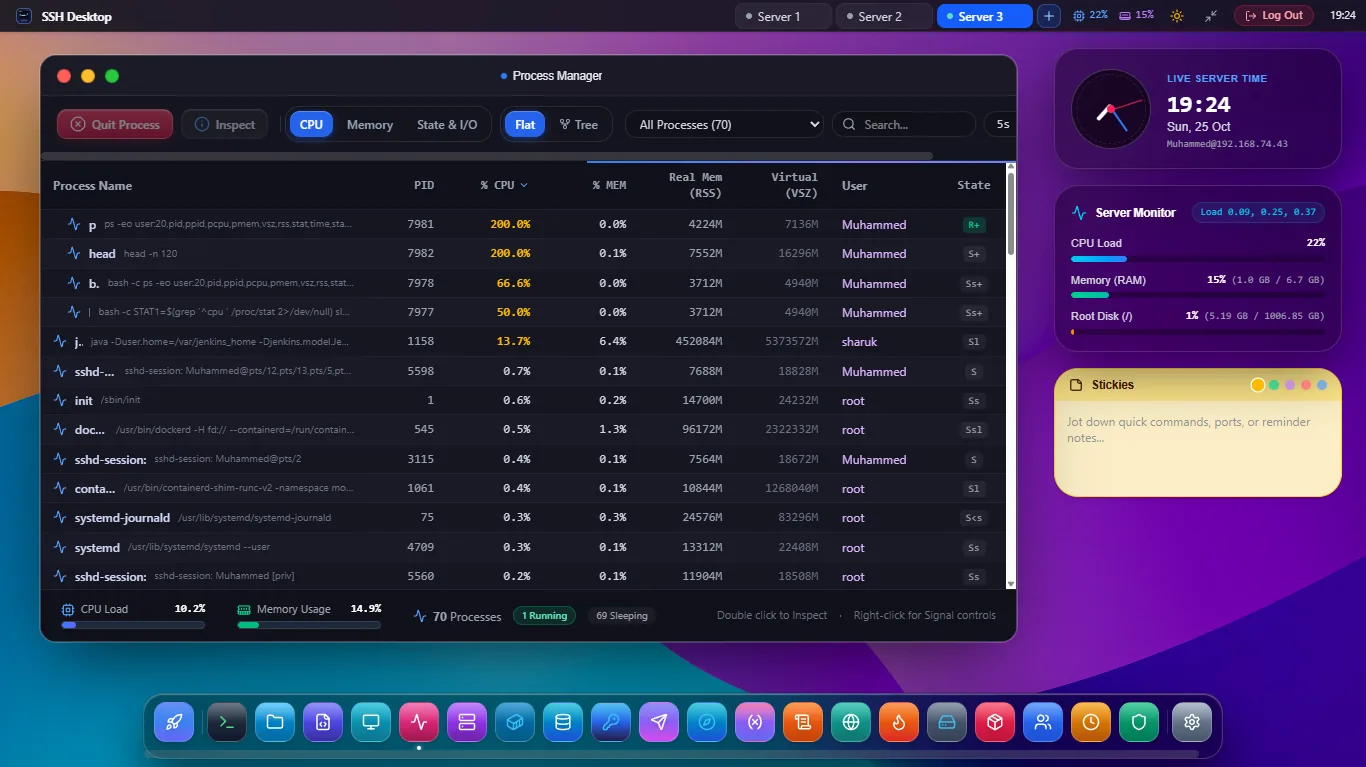
Granular Process Auditing & Signal Dispatch
Process Tree & List Views
Toggle between a sortable high-density grid and an expandable tree view illustrating process parentage from systemd (PID 1) down to ephemeral worker threads.
POSIX Signal Controls
Send standard Linux signals directly: SIGTERM (15) for graceful termination, SIGKILL (9) for forced stop, and SIGHUP (1) to trigger configuration reloads.
Renice Priority Adjuster
Dynamically alter process scheduling priority with a smooth slider from -20 (maximum real-time priority) to 19 (idle priority), leveraging native renice semantics.
One-Click Linux Process Signal Operations
| Signal | Standard Value | Action in SSH Desktop | Safety Confirmation |
|---|---|---|---|
| SIGTERM | 15 | Requests graceful clean shutdown (lets app flush buffers and close connections) | Standard confirm prompt |
| SIGKILL | 9 | Immediate kernel-level termination of unkillable or zombie processes | High-contrast danger modal |
| SIGHUP | 1 | Instructs daemons (e.g., Nginx, Apache, Postfix) to re-read config files | Instant 1-click execution |
| SIGSTOP / CONT | 19 / 18 | Pauses and resumes execution without terminating state in RAM | Instant toggle |
Frequently Asked Questions
Can I filter processes by specific users like www-data or postgres?
Yes. The search bar supports instant filtering by PID, user name, process name, or full command line arguments with live real-time filtering as you type.
Do I need sudo permissions to kill another user's process?
You can terminate any process owned by your logged-in SSH user directly. If you need to terminate root processes or system services, SSH Desktop will safely prompt for sudo escalation using non-interactive PTY authentication.
Can I view open ports or file descriptors for a specific process?
Yes! Right-clicking any process allows you to jump directly to Network & Port Auditor (App 13) or view its open file handles via lsof.
Take Full Control Over Your Linux Processes
Download SSH Desktop for Windows, macOS, or Linux. Free and open source with 25 built-in server administration tools.