
Visual Linux Systemd GUI & Service Manager
Inspect, start, stop, reload, and audit all systemd background daemons graphically. Stream real-time journalctl logs with zero buffer delay and toggle boot-time startup with an intuitive switch.
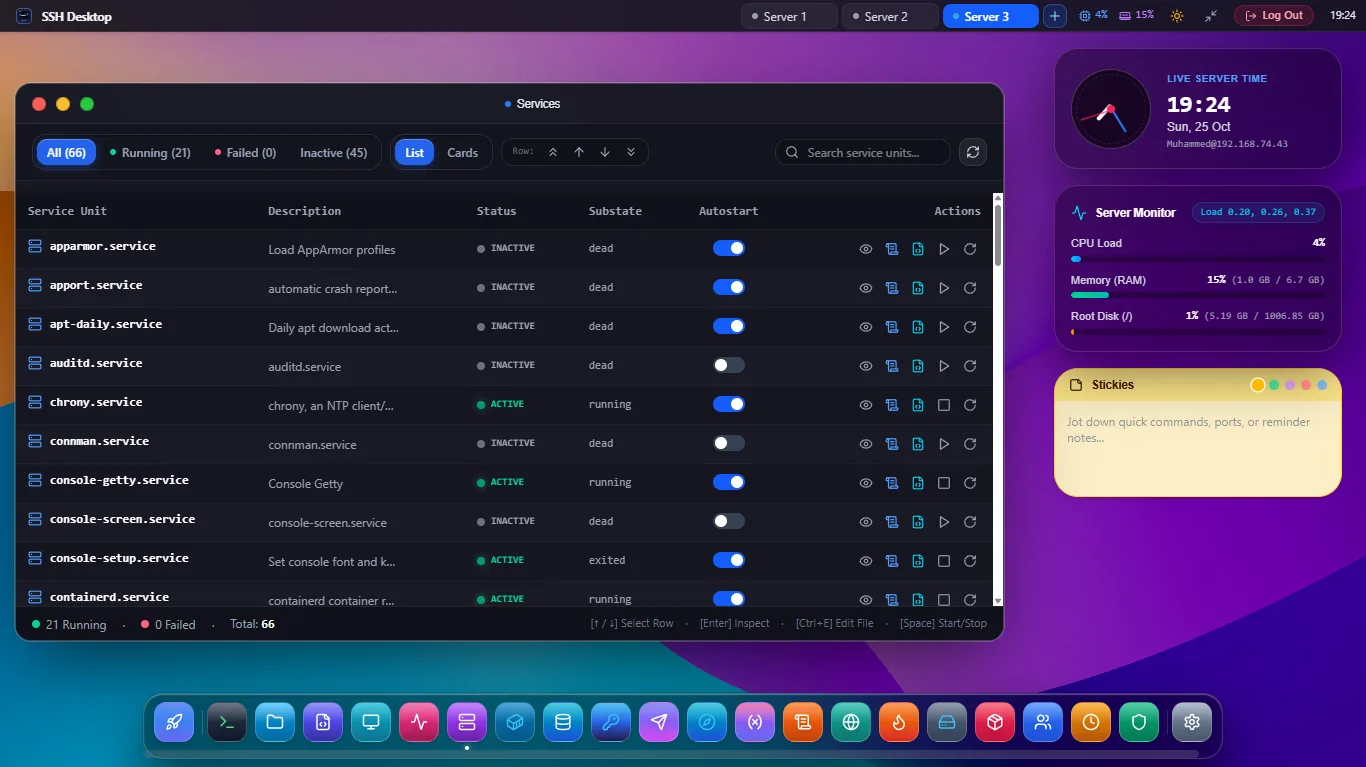
Master Background Services Without Typing systemctl
Streamline DevOps troubleshooting with instant status overviews and integrated logs.
Service Lifecycle Controls
Start, stop, restart, and reload services (such as Nginx, Docker, PostgreSQL, MySQL, Redis) in one click with safety confirmations.
Live Journalctl Streaming
Stream real-time output logs with journalctl -u [unit] -f directly beneath the service table. Features keyword filtering and ANSI syntax color.
Failed Units Filter
Diagnose server issues instantly. Click Failed Units to isolate crashed services, view exit codes, and inspect failure stack traces.
Boot Startup Toggles
Toggle systemctl enable or disable with a visual switch. Never forget to configure essential services to launch on server reboot.
Timers & Sockets
Inspect systemd scheduled timers (the modern cron replacement) and socket activation listeners across all system and user units.
Daemon Reload
Edited a unit file? Click Reload Daemon to run systemctl daemon-reload instantly without switching to terminal.
SSH Desktop vs Cockpit vs Terminal CLI
| Feature / Capability | SSH Desktop | Cockpit Web Console | Standard Terminal CLI |
|---|---|---|---|
| Background Server RAM | 0 MB (Zero Daemon) | 80MB - 120MB | 0 MB |
| Real-Time Log Streamer | Zero-Buffer ANSI Stream | Web Log Viewer | Clutters terminal buffer |
| Boot Enablement Switch | 1-Click Toggle | 1-Click Toggle | Verbose command |
| Required Open Ports | Standard SSH Port 22 | Port 9090 Web Daemon | Port 22 |
| Integrated SFTP & Monaco Editor | Edit configs in-place | No SFTP | Nano / Vim only |
Frequently Asked Questions
Does SSH Desktop support custom user units (systemctl --user)?
Yes. You can switch between System units (requiring sudo privileges) and User units (running in the unprivileged user session) with a single tab switch.
Can I create a new systemd service file graphically?
Yes! Click + New Service to open our service generator wizard. Define the Unit description, ExecStart command, restart policies, and dependencies, and save it directly to /etc/systemd/system/.
What happens if a service crashes?
SSH Desktop immediately highlights crashed units in red. Click the service to see its exit status code, PID, memory footprint before crashing, and the last 100 journalctl output lines.
Take Full Control of Linux Systemd Today
Download SSH Desktop for Windows, macOS, or Linux. Enjoy the visual systemctl manager for free.