
Visual Log Analysis & Grep Studio
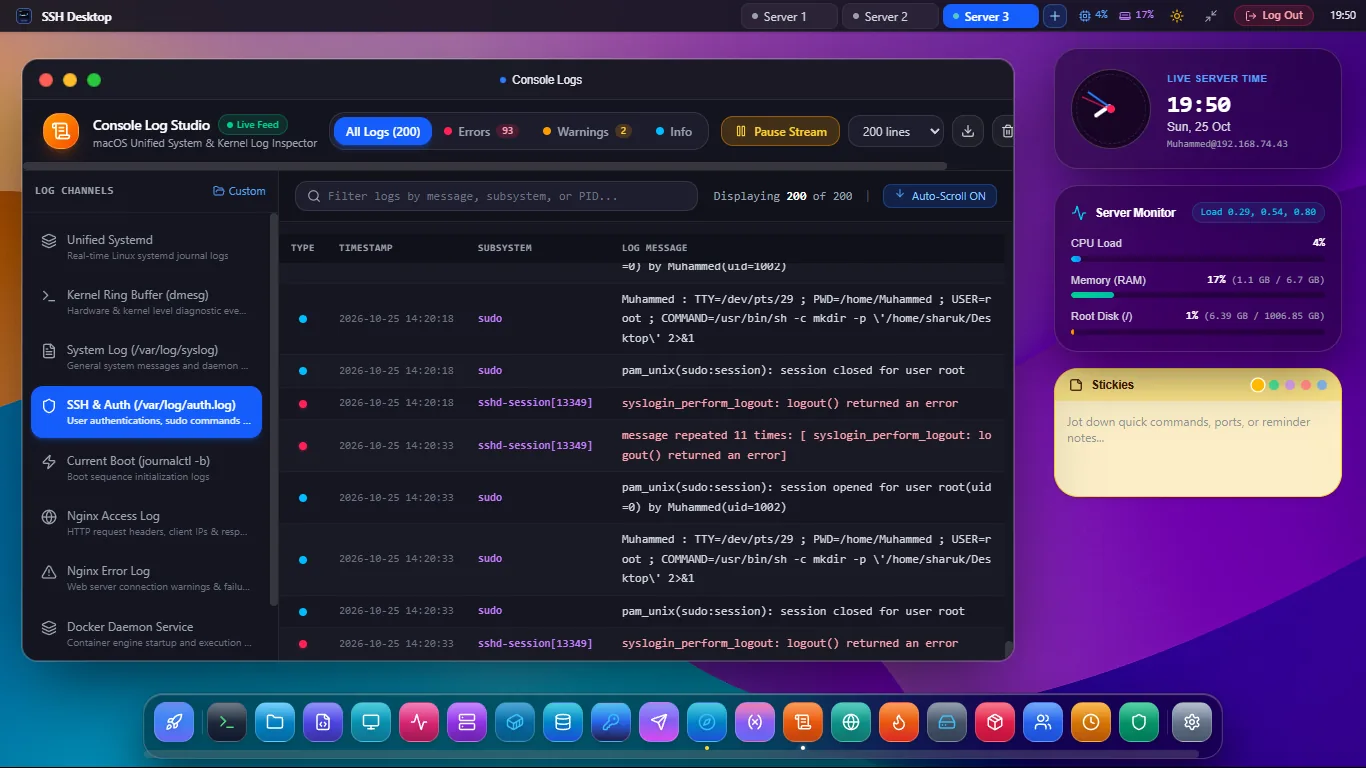
Stop getting lost in thousands of messy terminal log lines. Stream journalctl and /var/log in real time with high-speed regex filtering, colorized severity tagging, and instant jump-to-fix shortcuts.
Deep Server Log Intelligence Without Heavy SaaS Bloat
Real-Time Streaming Tail
Stream logs continuously over encrypted SSH2 with auto-scroll lock, live pause/resume buttons, and automatic re-connection if the server restarts.
High-Speed Regex Search
Filter millions of lines instantly with regular expressions, inverse filtering (grep -v), and case-sensitivity toggles with syntax highlighting.
Colorized Severity Tagging
Automatically flags log lines by syslog severity level: EMERG, CRIT, ERR (Red), WARN (Amber), INFO (Cyan), and DEBUG (Muted).
Unified Access Across Modern & Classical Linux Logs
| Log Category | Underlying Filesystem Path | Filtering Capabilities | Quick Actions |
|---|---|---|---|
| Systemd Journal | journalctl -u [unit] |
Filter by unit, boot number (-b), since time (--since) |
Jump to Systemd Services Manager |
| Authentication Logs | /var/log/auth.log or /var/log/secure |
Filter failed SSH passwords, sudo escalations, invalid users | Ban attacker IP via Firewall GUI |
| Web Server Access & Error | /var/log/nginx/*, /var/log/apache2/* |
Filter HTTP 500 errors, 404 scans, client IP addresses | Edit config in Monaco Editor |
| Database Engines | /var/log/mysql/*, /var/log/postgresql/* |
Filter slow queries, deadlocks, connection aborts | Open in Database Studio |
Frequently Asked Questions
Can I search compressed log archives (.gz)?
Yes. The studio seamlessly invokes streaming zgrep under the hood to search rotated gzipped archives without decompressing them to disk, saving space and time.
How does SSH Desktop handle multi-gigabyte log files without freezing?
It reads files via reverse byte-offset seek buffers rather than reading the entire file into memory. It streams only the newest requested chunk (e.g. last 1,000 lines) and lazily fetches older lines on scroll-up.
Can I export filtered log snippets for bug reports?
Yes. A single "Copy Filtered Lines" or "Save to File" button exports matching log entries directly to your local clipboard or downloads it as a .log or .txt file.
Debug Server Issues in Record Time
Download SSH Desktop for Windows, macOS, or Linux. Free and open source with 25 built-in server administration tools.