
The Cross-Platform MobaXterm Alternative
Looking for MobaXterm on macOS or Ubuntu? MobaXterm only runs on Windows and limits free users to 12 sessions. Upgrade to SSH Desktop: unlimited tabs, dual-pane SFTP, in-place Monaco editor, and 25 built-in server administration apps for 100% free.
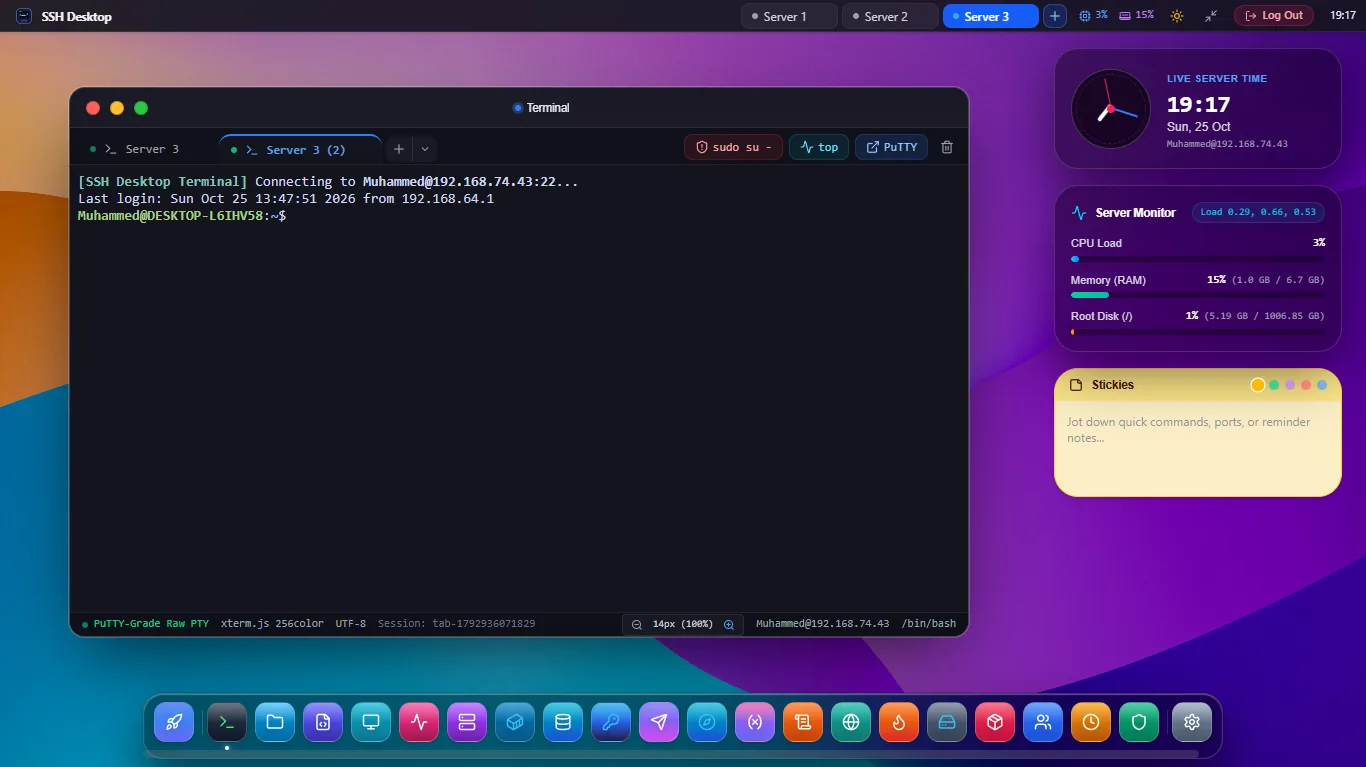
/dev/pts allocation that passes all requiretty checks.
Why Mac & Linux Users Need SSH Desktop
MobaXterm is tied to legacy Windows components. SSH Desktop is built from the ground up for modern developer platforms.
⚠ MobaXterm Drawbacks
- Zero Mac Support: Completely unavailable on macOS; developers must run Wine or slow virtual machines.
- Zero Linux Support: No native Linux package for Ubuntu, Debian, Fedora, or Arch.
- Arbitrary Session Limits: The free version blocks users after saving more than 12 sessions.
- Outdated UI: Cluttered Windows XP-era interface with sluggish X11 server forwarding.
- Expensive Pro Tier: Charges $69/user per year just to unlock unlimited sessions and tunnels.
✓ The SSH Desktop Advantage
- Native macOS App: Apple Silicon (M1–M4) optimized DMG with frosted glass Sonoma UI.
- Native Linux App: Official
.deb,.rpm, AppImage, and Flatpak binaries. - Unlimited Everything: Save unlimited sessions, configure unlimited tunnels, connect to unlimited servers.
- Modern Monaco Editor: Embedded VS Code core with syntax highlighting and in-place diffs.
- 100% Free & Open Source: Zero licenses, zero subscriptions, zero artificial limitations.
SSH Desktop vs MobaXterm Home vs MobaXterm Pro
| Feature / Capability | SSH Desktop | MobaXterm Home (Free) | MobaXterm Pro ($69/yr) |
|---|---|---|---|
| macOS Support (Apple Silicon & Intel) | Native 64-bit App | Not Supported | Not Supported |
| Linux Desktop Support (.deb / .rpm) | Native Packages | Not Supported | Not Supported |
| Saved SSH Sessions Limit | Unlimited | Max 12 Sessions | Unlimited |
| Simultaneous SSH Tunnels | Unlimited Visual Canvas | Max 2 Tunnels | Unlimited |
| In-Place Remote Zip Extraction | Server-Side Engine | Downloads first | Downloads first |
| Docker & Container Hub | Built-in App 5 | None | None |
| Database Studio (Postgres/MySQL/Redis) | Built-in App 6 | None | None |
| Cost | $0 (Free Forever) | $0 (Severely limited) | $69 / user / year |
Frequently Asked Questions
How do I import my MobaXterm saved sessions into SSH Desktop?
In MobaXterm, export your sessions to an .ini or .mxtsessions file. In SSH Desktop, click Settings > Import Sessions > MobaXterm. Your hostnames, ports, usernames, and SSH key paths will be automatically converted and securely imported into your local encrypted vault.
Can I split terminal panes horizontally and vertically?
Yes. Just like MobaXterm, SSH Desktop supports multi-tab sessions and multi-pane splitting (Ctrl+Shift+D for vertical split, Ctrl+Shift+E for horizontal split) with independent PTY shells.
Does SSH Desktop support X11 forwarding?
Yes. You can enable X11 forwarding with a single toggle in your host profile. However, SSH Desktop's 25 native graphical applications (file manager, code editor, database studio, Docker hub, firewall) render natively with zero latency, making slow X11 forwarding obsolete for 99% of tasks.
Experience the Modern MobaXterm Alternative
Download SSH Desktop for macOS, Windows 11, or Linux. Enjoy unlimited sessions and built-in server administration tools for free.