
Embedded Browser & Reverse Proxy over SSH
Stop configuring complicated local port forwards just to view a web service. Access internal web apps on 127.0.0.1:3000, Grafana, Portainer, or Tomcat directly inside your remote cloud desktop.
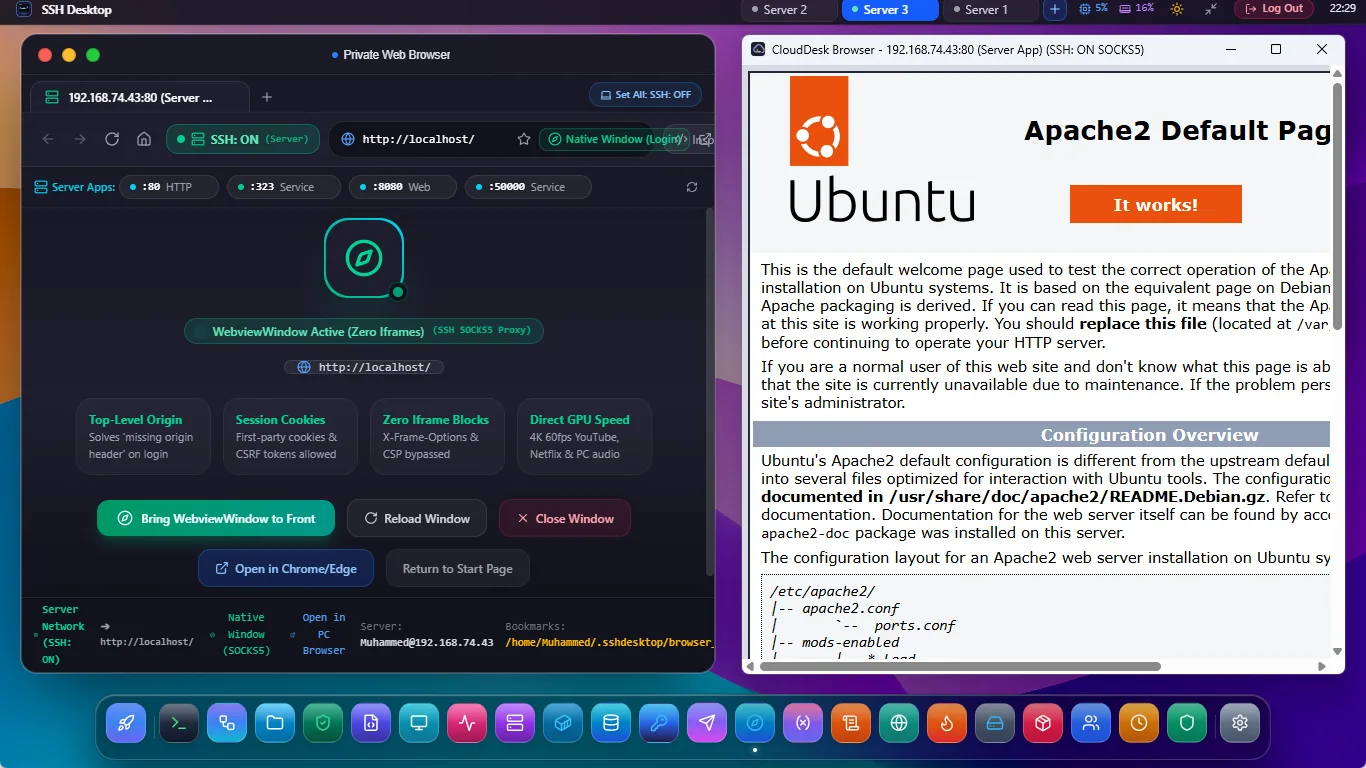
Seamless Access to Private Server Web Services
Header-Stripping Engine
Automatically eliminates restrictive X-Frame-Options: DENY and CSP headers server-side, allowing any local web application to render cleanly inside the desktop.
1-Click Quick Bookmarks
Pre-configured shortcuts for popular developer ports: :3000 (React/Node), :8080 (Java), :8000 (Django), :9000 (Portainer), and :5000 (Flask).
Total Isolation
Local storage, session storage, and cookies remain completely isolated per server connection tab, preventing authentication collisions across multiple server environments.
Traditional Localhost Forwarding vs. In-Desktop Browser
| Workflow Step | SSH Desktop Embedded Browser | Manual SSH -L Port Forwarding | Exposing Port on Firewall |
|---|---|---|---|
| Setup Steps | 1 Click (Open Browser → Click :3000) | Terminal command: ssh -L 3000:127.0.0.1:3000 user@server |
Edit UFW rules & risk internet exposure |
| Port Conflicts | Zero (Runs isolated in app context) | Fails if local PC already has port 3000 in use | Requires unique public port assignment |
| Security Surface | 100% Private (0 public open ports) | Private over SSH tunnel | High vulnerability risk from internet bots |
| Multi-Server Support | Independent per-server browser tabs | Clashes with multiple remote servers on same port | Requires multiple domain configs |
Frequently Asked Questions
Can I inspect elements or view console logs inside the embedded browser?
Yes. Right-clicking within the browser view allows you to toggle DevTools, letting you inspect HTML elements, debug CSS styles, and view JavaScript console logs.
Does it support WebSocket connections for live reloading (HMR)?
Yes. The embedded reverse proxy transparently forwards HTTP Upgrade headers, fully supporting WebSocket connections used by Vite, Webpack Hot Module Replacement (HMR), and real-time chat sockets.
Can I browse remote HTTPS endpoints with self-signed certificates?
Yes. A toggle lets you choose whether to accept or strictly validate self-signed certificates for internal development and staging environments.
Preview Your Server Web Apps Instantly
Download SSH Desktop for Windows, macOS, or Linux. Free and open source with 25 built-in server administration tools.