
Visual Multi-Server Automation & Snippets
Execute commands across 10, 50, or 100 Linux servers simultaneously without writing complex Ansible playbooks. Build reusable snippet libraries, tag server clusters, and track parallel execution in real time.
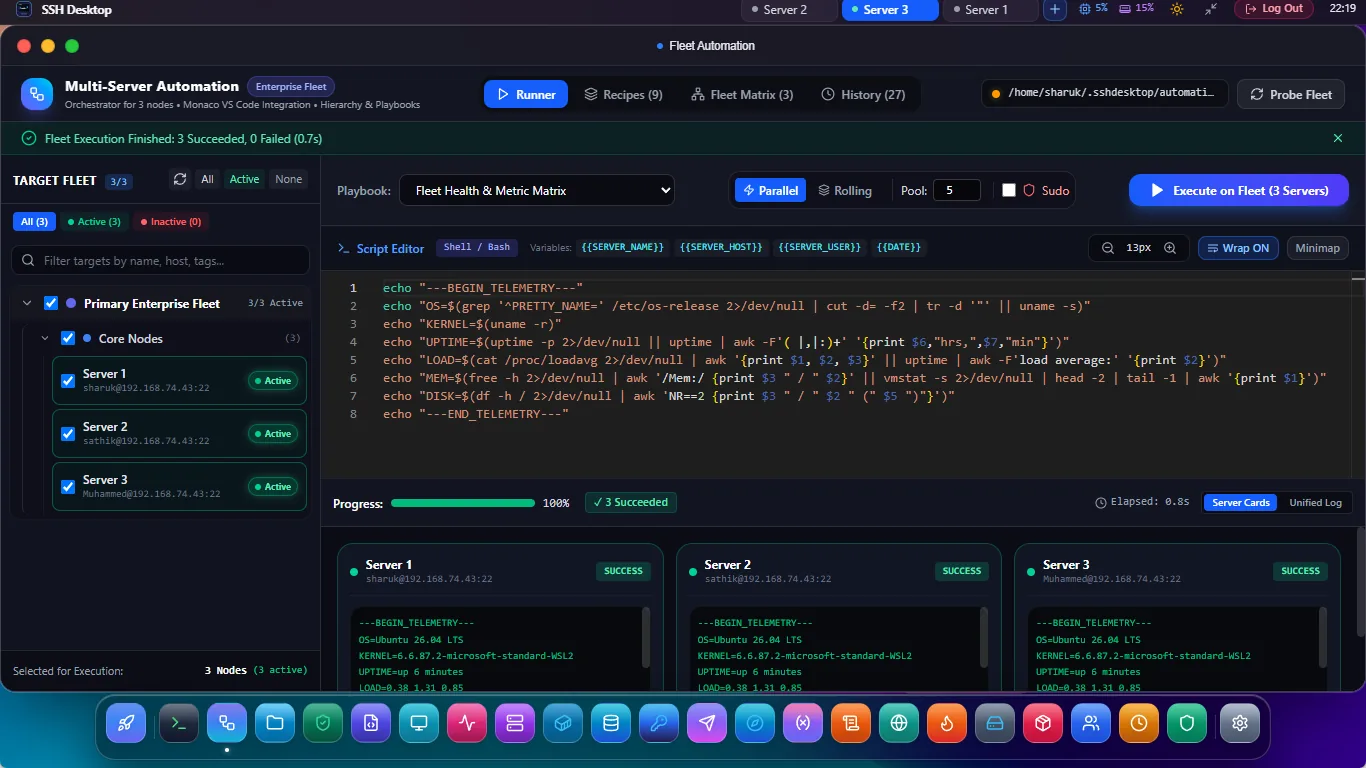
Zero-Agent Parallel Execution for DevOps
Parallel Broadcast Engine
Dispatches tasks across all target nodes concurrently over native SSH2. Upgrade packages or audit kernel versions across your entire cluster in under 10 seconds.
Snippet Library with Templates
Save complex deployment, diagnostic, and maintenance scripts. Declare reusable template variables like {{APP_DIR}} and {{PORT}} for one-click reuse.
Fleet Tagging & Filtering
Organize servers with tags like [production], [web-frontend], [database]. Broadcast scripts to targeted sub-fleets with one click.
SSH Desktop Fleet Automation vs. Ansible / Puppet
| Workflow Feature | SSH Desktop (App 21) | Ansible | Puppet / Chef |
|---|---|---|---|
| Setup Overhead | Instant (0 installation, GUI click) | Requires Python environment & YAML playbooks | Heavy master-agent infrastructure |
| Learning Curve | Standard Bash & visual inputs | Complex Jinja2 templating and YAML modules | Proprietary DSL / Ruby coding |
| Real-Time Execution Feedback | Live multi-host streaming grid | Delayed sequential task outputs | Requires log aggregator daemon |
| Safety Confirmation | Visual destructive command gate | Manual --check flag required |
Complex dry-run simulations |
Frequently Asked Questions
What prevents running a dangerous command on production servers by mistake?
SSH Desktop has an intelligent risk analyzer: if your snippet contains destructive commands like rm -rf /, dd, reboot, or mkfs, it presents a red security modal requiring you to type "CONFIRM" and reviews the exact host list before executing.
Can I run scripts sequentially with fail-on-error stops?
Yes. You can switch between "Parallel All" mode and "Sequential Rolling" mode with an option to halt the rollout if any single host returns a non-zero exit code.
Can I export execution outputs and exit codes?
Yes. All output logs across all nodes can be exported as a consolidated JSON or CSV file for audit trails and compliance records.
Orchestrate Your Server Fleet with Ease
Download SSH Desktop for Windows, macOS, or Linux. Free and open source with 25 built-in server administration tools.